

Learning how to write effective meeting minutes is easier than you think. Meeting minutes are the official notes from a meeting. They help your team remember what was discussed, what decisions were made, and who needs to do what next. In this guide, you’ll learn exactly how to write effective meeting minutes that are clear, helpful, and professional.
Whether this is your first time taking notes at a meeting or you want to get better at it, this guide will teach you everything you need to know. We’ll explain why meeting minutes matter, show you what to include, and give you free templates to make the job easier.

What Are Meeting Minutes? (And Why Do They Matter?)
Meeting minutes are the written record of everything important that happened in a meeting. Think of them as a summary that answers these questions:
- What topics did we talk about?
- What decisions did we make?
- Who needs to do what?
- When is the deadline?
Many people think meeting minutes should include every word that was said. That’s wrong. Good meeting minutes only include the important stuff—the key points, decisions, and action items.
Meeting minutes help your team in several ways:
Keep Everyone Accountable: When you write down who is responsible for each task and when it’s due, people are more likely to follow through.
Create a Record: Minutes help you look back and remember what happened in past meetings. This is helpful for new team members or when you need to remember why a decision was made.
Solve Arguments: If two people remember a meeting differently, the official minutes can clear things up.
Meet Legal Requirements: Some organizations, especially boards and government groups, are required by law to keep meeting minutes.
What Should You Include in Meeting Minutes?
Good meeting minutes always include the same basic information. Here’s what to document every time:
| Category | Essential Details to Document |
| Basic Logistics | Date, time, and location. Who attended and who was absent. |
| Agenda & Topics | A short summary of each topic on the agenda. |
| Key Decisions | Any choices, agreements, or votes that happened. |
| Action Items | Specific tasks, who will do them, and when they’re due. |
| Announcements | Important news or updates shared during the meeting. |
| Next Meeting | Date and time for the next meeting. |
Who Should Write the Meeting Minutes?
Usually, one person is assigned to take notes at each meeting. This might be:
- A secretary or assistant
- The meeting leader
- A team member who takes turns
Good note-takers have these skills:
Strong Listening: They can hear what’s important and ignore the small talk.
Knowledge of the Topic: They understand what the meeting is about, which helps them know what to write down.
Neutral Attitude: They don’t add their own opinions. They just write down the facts.
Clear Writing: They can turn messy notes into clean, easy-to-read documents.
How To Write Effective Meeting Minutes: 5 Easy Steps
Here’s the simple process for how to write effective meeting minutes that work:
Step 1: Get Ready Before the Meeting
Good preparation makes everything easier.
Read the Agenda: Look at the meeting plan ahead of time. This helps you know what topics will be covered.
Use a Template: Have a blank template ready to fill in. This saves time and helps you remember what to include. (We’ll give you free templates below.)
Talk to the Meeting Leader: Ask if they want detailed notes or just a basic summary.
Step 2: Take Notes During the Meeting
Focus on capturing the most important information.
Write Down Decisions and Action Items: These are the most important parts. Don’t worry about writing every comment people make.
Use Shortcuts: Create your own short forms for common words. For example, use “AI” for “action item” or “JD” for “John Doe.”
Follow the Agenda: Organize your notes by agenda topic. This makes it easier to write up later.
Ask Questions When Needed: If something is unclear, politely ask for clarification. It’s better to ask now than to guess later.
Step 3: Write Your First Draft Right After the Meeting
As soon as the meeting ends, turn your notes into a clean draft while everything is still fresh in your mind.
Organize by Topic: Use your template. Start with the basic information (date, time, attendees), then summarize each agenda item.
Write Simply: Use short sentences and bullet points. Make it easy to read.
Be Specific About Tasks: Every action item should clearly state who will do it and when it’s due.
Step 4: Review and Fix Any Mistakes
Before you send out the minutes, double-check everything.
Proofread: Look for spelling mistakes, wrong names, or incorrect dates.
Get Feedback: Show your draft to the meeting leader or another attendee. Ask if you missed anything important.
Make Changes: Update the draft based on any feedback you receive.
Step 5: Send Out the Minutes
Share the finished minutes quickly so people can take action.
Send Them Fast: Try to send the minutes within 24-48 hours of the meeting.
Choose the Right Way to Share: Email them, put them on a shared drive, or post them in your team’s project management tool.
Ask for Confirmation: Make sure everyone received the minutes and understands what they need to do.
How to Turn Your Notes Into Clear Action Items
The most valuable part of meeting minutes is the action items section. This tells people exactly what they need to do next.
Find the Tasks: Look through your notes for anything that requires follow-up.
Name Who’s Responsible: Write down exactly who will do each task.
Set Real Deadlines: Give a specific date, not vague words like “soon” or “later.”
Be Specific: Make the task clear and detailed.
Bad example: “Follow up on the report.”
Good example: “Sarah Johnson will email the Q3 budget report to the executive team by 5:00 PM on Friday, March 14th, 2025.”
Meeting Minutes vs. Meeting Notes: What’s the Difference?
People often confuse these two things, but they’re not the same.
Meeting Notes are your personal reminders. They might be messy, incomplete, or include your own thoughts. You keep them for yourself.
Meeting Minutes are the official company record. They’re clean, organized, and focused only on facts. You share them with everyone who needs to know what happened.
When you learn how to write effective meeting minutes, you’re learning to create that official record, not personal notes.
Do Meeting Minutes Need to Be Approved?
In most workplaces, yes. Meeting minutes should be reviewed and approved to make sure they’re accurate.
Here’s how approval usually works:
- You send out the draft minutes to all attendees
- At the start of the next meeting, everyone reviews them
- People can suggest corrections if something is wrong
- The group votes to approve the minutes
- Once approved, they become the official record
This process makes sure everyone agrees on what happened.
Free Meeting Minutes Templates
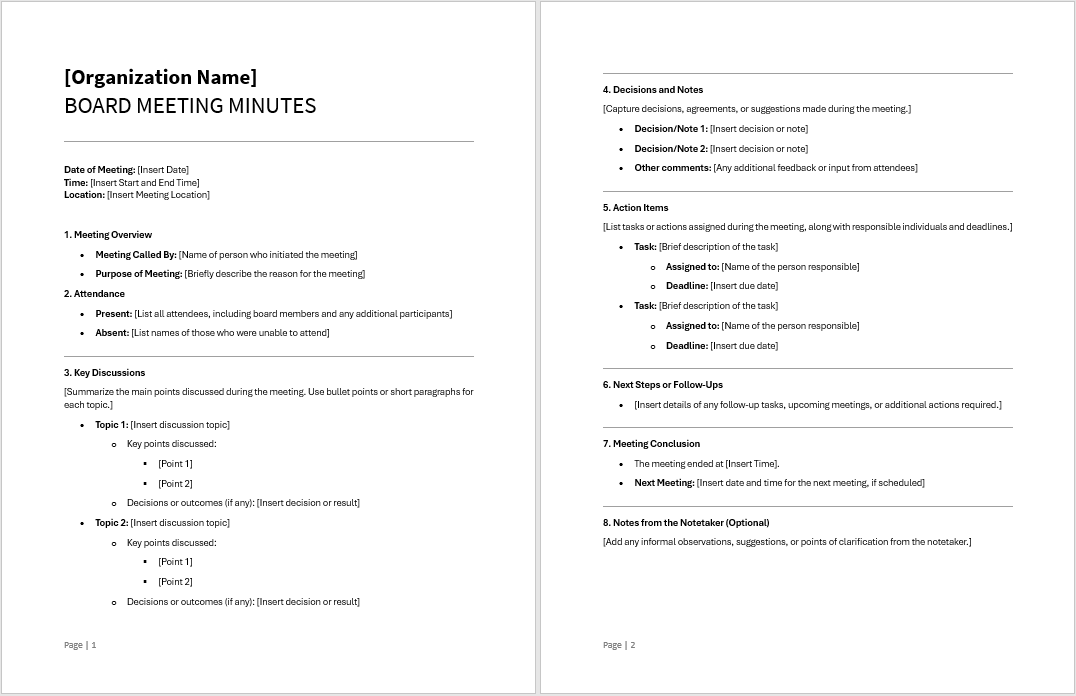
Templates make writing meeting minutes much faster and easier. Here are two you can download:
Formal Board Meeting Minutes Template
Use this for important meetings like board meetings or executive sessions where decisions have major consequences.

Informal Board Meeting Minutes Template
Use this for regular team meetings, brainstorming sessions, or quick check-ins.
Simple Tips for How To Write Effective Meeting Minutes
Follow these tips to make your minutes clear and useful:
Keep It Short: Only include important information. Leave out small talk and off-topic conversations.
Stay Neutral: Don’t add your opinions. Just write the facts.
Use Headers: Bold titles and clear sections make the document easy to scan.
Highlight Tasks: Put all action items in their own section so people can find them quickly.
Try Digital Tools: Apps like Trello, Asana, or Monday can help you turn minutes into trackable tasks.
Focus on Decisions, Not Debates: Write what was decided, not all the back-and-forth discussion.
Be Consistent: Use the same format every time so people know what to expect.
Use Simple Language: Avoid jargon and complicated terms unless absolutely necessary.
Common Mistakes to Avoid
Even experienced note-takers make these errors when learning how to write effective meeting minutes:
Writing Too Much: Minutes aren’t word-for-word transcripts. Focus on outcomes, not every comment.
Forgetting Action Items: If you don’t clearly write down who does what by when, your minutes aren’t helpful.
Waiting Too Long to Share: If you wait several days to send minutes, people forget the context and lose momentum.
Being Vague: Words like “soon,” “maybe,” or “probably” are too unclear. Be specific.
Not Listing Who Was Absent: Always note who missed the meeting. This keeps the record complete.
Adding Personal Opinions: Minutes must be neutral. Save your thoughts for other conversations.
Poor Organization: Random notes scattered on a page don’t help anyone. Use a clear structure.
How Long Should Meeting Minutes Be?
The right length depends on your meeting, but here are good guidelines:
- 30-minute meeting: 1 page or less
- 1-hour meeting: 1-2 pages
- 2-hour meeting: 2-4 pages
- All-day meeting: 4-6 pages
If your minutes are longer than this, you’re probably including too much detail. Remember: shorter and clearer is better than long and complicated.
Frequently Asked Questions About How To Write Effective Meeting Minutes
Q: How do you write effective meeting minutes?
A: Follow these five steps: (1) Prepare by reading the agenda and getting a template ready, (2) Take notes during the meeting focusing on decisions and action items, (3) Write a clean draft right after the meeting, (4) Review it for mistakes and get feedback, and (5) Send it out within 24-48 hours.
Q: What should be included in effective meeting minutes?
A: Include the date, time, and location; who attended and who was absent; a summary of each topic discussed; all decisions made; specific action items with who’s responsible and deadlines; any announcements; and when the next meeting will be.
Q: Who writes the meeting minutes?
A: Usually a secretary, assistant, or designated team member writes the minutes. This person should be a good listener, able to write clearly, and stay neutral without adding personal opinions.
Q: Do meeting minutes need to be approved?
A: Yes, in most professional settings. The minutes are usually reviewed and approved at the start of the next meeting. This makes sure everyone agrees the minutes are accurate and creates an official record.
Q: What’s the difference between meeting minutes and meeting notes?
A: Meeting notes are informal, personal reminders you keep for yourself. Meeting minutes are the official, formal record that gets shared with the whole team and kept permanently by the organization.
Q: How quickly should I send out meeting minutes?
A: Send them within 24-48 hours after the meeting. This keeps information fresh and helps people start working on their action items right away.
Q: Can I use a recording instead of writing minutes?
A: While recordings can help you review what was said, they’re not a replacement for written minutes. Minutes should be a short, organized summary—not a full transcript. Most people won’t listen to a full recording, but they will read clear minutes.
Become Great at Writing Meeting Minutes
Learning how to write effective meeting minutes is a valuable skill that will make you more helpful at work. Good meeting minutes keep teams on track, make sure tasks get done, and create a permanent record of important decisions.
The secret is simple: prepare before the meeting, focus on decisions and action items during the meeting, write your draft immediately after, get feedback, and share quickly. Use templates to stay consistent, keep your writing clear and simple, and always include who needs to do what by when.
With the tips in this guide, you now know exactly how to write effective meeting minutes that make a real difference. Practice these steps at your next meeting, and you’ll quickly become the go-to person for creating professional, helpful meeting documentation.
You Might Also Enjoy:




 EA and Beyond
Leave a comment