

Let’s get real about working from home. You’ve probably seen those beautiful home office setups on social media with perfect lighting, matching furniture, and not a cable in sight. Meanwhile, you’re reading this from your couch, kitchen table, or a corner of your bedroom wondering how anyone affords that kind of setup. The truth is, most remote workers are in the same boat as you. This guide will help you actually solve the problems you’re facing right now, without telling you to buy a standing desk or paint an accent wall.
I Don’t Have a Spare Room for an Office
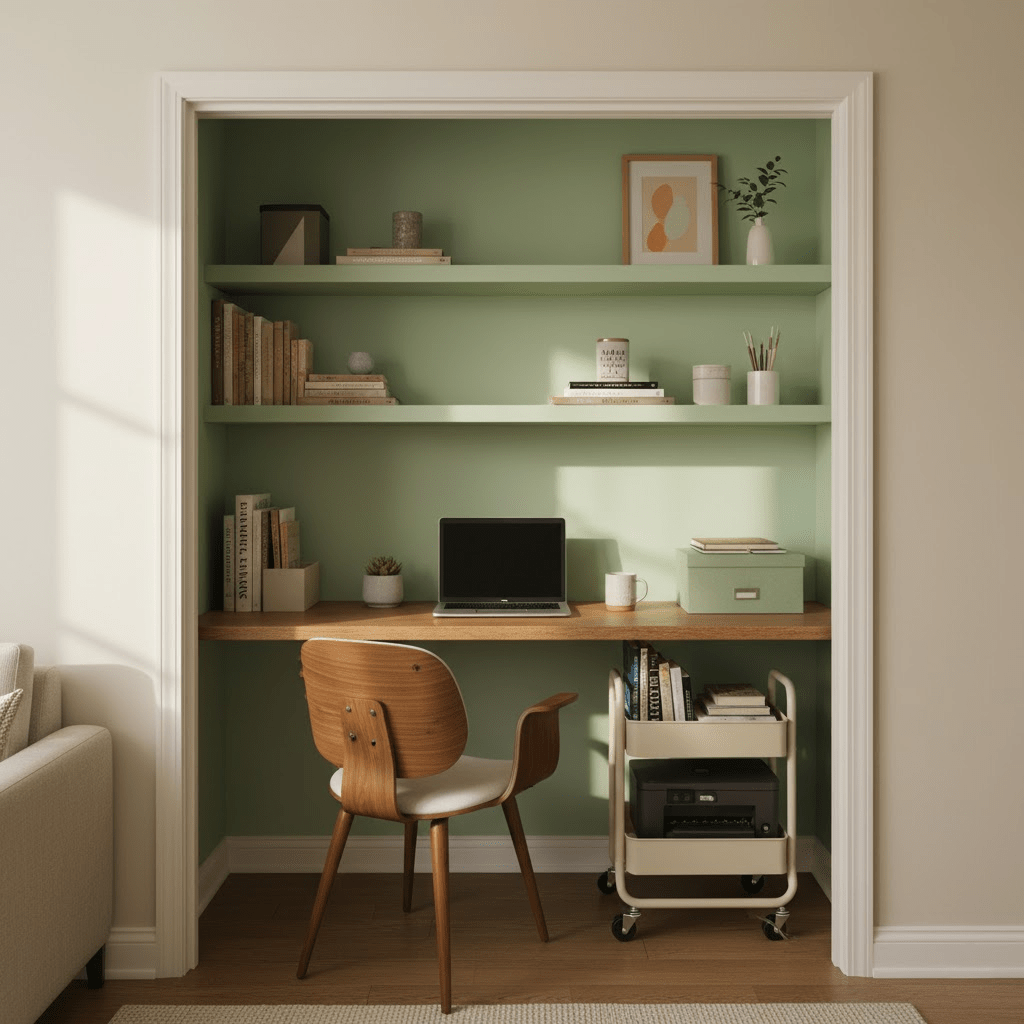
This is probably the most common challenge people face when starting to work from home. The good news is that you don’t actually need a spare room to work effectively. What you need is a designated spot that your brain can associate with work mode, even if that spot is just two feet of counter space.
Scout your home for underused areas. Can you fit a small desk in your bedroom corner? Is there space at the end of your hallway? Some people successfully work from large closets with the doors removed. The key is finding somewhere that isn’t your bed or your main relaxation spot. Your dining table can work, but only if you can leave your work setup there or you don’t mind the daily pack-up routine. If you’re using a shared space, get a rolling cart or a portable file box so you can quickly set up and break down your workspace each day. This makes the transition between work and home life much clearer.
My Internet Connection Keeps Dropping During Video Calls
Few things are more frustrating than losing connection in the middle of an important meeting. If your WiFi is unreliable, there are several things you can try before calling your internet provider. First, move your workspace closer to your router if possible. Walls, especially ones with metal or concrete, can seriously weaken your signal.
If you can’t move closer to the router, consider getting a WiFi extender for around $30 to $50. These boost your signal to reach dead zones in your home. For the most stable connection, use an ethernet cable to plug directly into your router. You can buy long cables online cheaply, and they make a huge difference for video calls. During important meetings, ask other people in your home to pause their streaming or gaming. If you’ve tried everything and your internet is still bad, talk to your employer about whether they can help with upgrading your plan. Many companies will cover internet costs for remote employees. As a backup plan, scope out nearby locations with reliable WiFi like libraries or coworking spaces for days when you have critical video meetings.
I Share My Space with Kids, Pets, or Roommates
Working from home while sharing your space with others requires strategy and communication. Start by having an honest conversation with everyone you live with about your work schedule and when you need quiet time. This isn’t always possible with young kids, but even toddlers can learn that when you’re wearing headphones or sitting at your workspace, it’s work time.
Create visual cues that signal you’re working. This could be a sign on your door, a specific hat you wear, or even just headphones. For kids, setting up a nearby activity station with quiet toys, coloring books, or educational apps can buy you focused time. Schedule your most important calls during nap time or when another adult can supervise if possible. With pets, the solution is usually exercise. A tired dog is a quiet dog. Take them for a walk before your workday starts. For cats, closing them out of your workspace during video calls might be your only option, even if they protest loudly. If you have roommates, coordinate schedules so you’re not both taking calls at the same time. Consider setting up a shared calendar so everyone knows when quiet hours are needed.
My Workspace Has Terrible Lighting
Bad lighting causes eye strain, headaches, and makes you look washed out or shadowy on video calls. Natural light is ideal, but most of us don’t have floor-to-ceiling windows. If your workspace is dim, start with the basics. Turn on all available lights in the room. Overhead lighting alone often creates harsh shadows, so add a desk lamp that provides light from the side.
For video calls specifically, lighting your face is more important than lighting your whole room. Position a lamp behind your computer screen so it shines on your face, or invest in a small LED panel light or ring light. These start around $15 and make a dramatic difference in how professional you look on camera. Avoid sitting with a window directly behind you, as this puts you in silhouette. Instead, face the window so natural light illuminates your face. If you work evening hours or in a windowless space, choose bulbs labeled “daylight” (5000K-6500K) rather than “warm white” as they’re better for productivity and alertness. You can also adjust your screen brightness to reduce eye strain. If your screen is much brighter than your surrounding environment, your eyes have to work harder.
I Can’t Afford to Buy Office Furniture Right Now
Here’s something the Instagram offices don’t show you: you can be productive without spending hundreds of dollars on furniture. Look around your home first. A sturdy cardboard box can elevate your laptop to eye level. A cutting board can create a standing desk surface on your counter. An ironing board actually makes a decent adjustable-height desk in a pinch.
Check Facebook Marketplace, Craigslist, Nextdoor, and local buy-nothing groups for free or cheap office furniture. Many people are giving away perfectly good desks and chairs when they move or renovate. Thrift stores like Goodwill often have office chairs for under $20. They might not be pretty, but they’re better than a kitchen chair for eight-hour workdays. If you need to buy something new, wait for back-to-school sales in July and August when office supplies are heavily discounted. Amazon Basics and Walmart both carry budget-friendly office essentials. Remember that you can always upgrade later. Starting with an imperfect setup is better than waiting until you can afford the perfect one. Your productivity matters more than your furniture’s price tag.
My Background Looks Messy on Video Calls
The anxiety about what coworkers see behind you on Zoom is real, but it’s usually more in your head than theirs. Most people barely notice backgrounds because they’re focused on what you’re saying. That said, if it’s bothering you, there are easy fixes that don’t require redecorating your entire home.
Use the virtual background or blur feature built into most video platforms. Zoom, Teams, and Google Meet all offer this option. If virtual backgrounds look weird with your lighting or computer, try the blur instead. It softens everything behind you without the glitchy edges. Physically, you can position yourself facing a blank wall or the most neutral part of your room. Before calls, do a quick five-second tidy of what’s visible in frame. Push clutter to the side, close that closet door, or angle your camera up slightly to show less of the room. Some people buy a folding screen or hang a curtain to create an instant backdrop. A sheet hung on a tension rod works fine and costs almost nothing. The most important thing to remember is that everyone is working from real homes right now. Your coworkers have seen backgrounds with unmade beds, piles of laundry, and kids running by in the background. You’re not being judged as harshly as you think.
I Get Distracted Constantly and Can’t Focus
Distractions at home are different than distractions at the office, and they require different solutions. Start by identifying your biggest distractions. Is it your phone? Social media? The TV? Household chores calling your name? Once you know what pulls your attention away, you can create barriers.
Put your phone in another room during focused work time or use app blockers like Freedom or Cold Turkey to block distracting websites during work hours. If household tasks distract you, make a list and tell yourself you’ll do them during lunch or after work. Sometimes just writing them down helps get them out of your head. Use the Pomodoro Technique: work for 25 minutes straight, then take a 5-minute break. This makes focus feel more manageable. During breaks, actually get up and move away from your workspace. Background noise can actually help some people focus. Try different types: brown noise, coffee shop sounds, lo-fi music, or nature sounds. Figure out what works for your brain. If you live alone and feel distracted by silence, working near a window where you can see some activity might help. The goal isn’t to eliminate all distractions, which is impossible. The goal is to catch yourself when you get distracted and gently redirect your attention back to work.
Working from My Bedroom Is Ruining My Sleep
This is a serious problem that many remote workers face. When your bedroom becomes your office, your brain stops seeing it as a place for rest. If you absolutely must work from your bedroom, there are ways to minimize the damage to your sleep quality.
Position your workspace so you can’t see it from your bed. If your room is too small for this, use a room divider, curtain, or even a large plant to create a visual barrier. At the end of each workday, put all work items out of sight. Close your laptop and put it in a drawer or closet. Cover your monitor with a cloth. This “closing” ritual signals to your brain that work time is over. Never work from your bed itself. This is the most important rule. Your bed should only be for sleep and relaxation. If you’re working on your laptop, sit at a desk or table, even if it’s a folding TV tray. Change locations for breaks. Eat lunch in another room. This helps your brain separate work space from rest space even within the same room. Consider adjusting your work hours if possible. Some people find it easier to maintain boundaries if they stop working earlier in the evening, giving their bedroom time to “become” a bedroom again before sleep.
I Feel Guilty About Not Having a “Professional” Setup
This feeling is common, but let’s be clear: your setup has nothing to do with the quality of your work. Companies care about results, not whether you have a Herman Miller chair. If you’re meeting deadlines and doing good work, it doesn’t matter that you’re doing it from a kitchen table.
The comparison game with social media home offices is toxic. Those picture-perfect setups are often staged for photos or belong to people with very different budgets and living situations than yours. They don’t show the reality of daily work life. Many successful remote workers have messy desks, mismatched furniture, and work in their pajamas. What makes someone good at their job is their skills and work ethic, not their aesthetic. If your employer has never complained about your work quality, your setup is fine. Focus your energy on doing your job well rather than worrying about how your workspace looks. If you’re concerned about appearing unprofessional on video calls, remember that showing up on time, being prepared, and contributing meaningfully matters infinitely more than your background. Most professionals respect the reality that we’re all working from real homes with real limitations.
My Workspace Is Too Hot, Too Cold, or Just Uncomfortable
Temperature and comfort issues can seriously affect your productivity, but they’re fixable without central air conditioning or a renovation. If your workspace is too hot, position a small fan to create airflow. Close blinds or curtains during the hottest part of the day to block direct sunlight. Work during cooler morning hours if your schedule allows. Dress in light, breathable fabrics and keep cold water at your desk.
If you’re too cold, dress in layers so you can adjust throughout the day. A space heater under your desk can warm you without heating the whole room (just make sure it’s on a flat surface and not a fire hazard). Warm drinks help too, and the ritual of making tea or coffee gives you natural breaks. Fingerless gloves can keep your hands warm while still allowing you to type. For general discomfort, assess what’s actually bothering you. Is your chair too hard? Add a cushion. Are your feet dangling? Put a box under your desk as a footrest. Is your neck stiff? Adjust your screen height. Small adjustments make a big difference. Take stretch breaks every hour. Set a timer if you need to. Stand up, roll your shoulders, stretch your neck, and move around for just a minute or two. Your body wasn’t designed to sit still for eight hours straight, and regular movement prevents the stiffness and pain that come from staying in one position.
I’m Working from Home Long-Term and Need to Think Bigger
If remote work is your permanent situation, it’s worth creating a more intentional workspace even if you don’t have a dedicated office. This doesn’t mean spending thousands of dollars. It means making strategic improvements over time based on what actually bothers you about your current setup.
Start by listing your top three pain points. Maybe it’s back pain, poor lighting, and no storage for work supplies. Address these one at a time as your budget allows. A good ergonomic chair might be worth saving up for if back pain is affecting your daily life. Used office furniture stores often have high-quality chairs at steep discounts. For storage, simple solutions like a file box, rolling cart, or wall-mounted shelves can organize your supplies without taking up floor space. Think about workflow efficiency. Do you waste time looking for things? Create designated spots for everything you use daily. Do you feel cramped? Can you rearrange furniture to give yourself more space, even if it means using your living room differently? Sometimes the answer isn’t buying new things but reimagining how you use what you have. Set a small monthly budget for workspace improvements, even if it’s just $20. Over a year, that adds up to meaningful upgrades. Prioritize items that affect your health and ability to work over decorative items. Function always comes before form when you’re working with limited space and budget.
The bottom line is this: you don’t need a perfect space to do great work from home. What you need is a space that works for your specific situation, whatever that looks like. Stop comparing your real workspace to someone else’s carefully curated photos. Focus on solving your actual problems with practical solutions. Your productivity comes from you, not from your furniture.
You Might Also Enjoy:



 EA and Beyond
Leave a comment