

Let’s be honest: most business travel itineraries are terrible. They’re either a forwarded email chain with six different flight confirmations, a calendar invite that says “Conference – details TBD,” or a PDF someone created in 2019 that nobody’s looked at since.
This business travel itinerary guide will show you how to build something actually useful—an itinerary that makes travel smoother, keeps executives sane, and ensures nothing falls through the cracks.
What Makes a Business Travel Itinerary Actually Work
A good itinerary isn’t just a list of flights and hotels. It’s the difference between your executive confidently walking into meetings versus frantically texting you from the airport asking where they’re supposed to be.
Here’s what a working itinerary does:
Eliminates the “wait, what’s happening?” moments. Everything they need is in one place. No digging through emails at 6am in a hotel lobby.
Builds in buffer time. Because flights get delayed, traffic exists, and humans need to eat and occasionally use bathrooms.
Accounts for the stuff nobody remembers until it’s too late. Time zones. Weather. The fact that their phone might not work internationally. Whether they need cash for taxis.
Think of it as preventive medicine for business travel disasters.
The Non-Negotiables: What Every Business Travel Itinerary Must Include
Flight & Transportation Details (The Obvious Stuff, Done Right)
Don’t just write “United 1247.” Give them everything:
- Full flight details: Airline name, flight number, departure/arrival times in BOTH time zones, terminal and gate info if you have it
- Airline confirmation code: Make it bold. Make it easy to find.
- Airport transportation: Exact instructions for how they’re getting from the airport to the hotel (car service confirmation, Uber estimate, train/metro directions)
- Return transportation: Because forgetting the ride back to the airport is a special kind of panic
Pro tip: Include the airline’s customer service number. When things go wrong, they go wrong at the airport when nobody has time to Google.
Hotel Information (More Than Just an Address)
The hotel block should answer every possible question before they ask it:
- Hotel name, full address, and phone number
- Check-in/check-out times (and early check-in confirmation if you secured it)
- Reservation confirmation number
- Room type and any special requests you made
- Hotel amenities they might need (gym hours, business center, breakfast times)
- Distance and travel time to their main meeting location
Pro tip: Screenshot the hotel location on a map and include it. “123 Main Street” means nothing when you’re jet-lagged in an unfamiliar city.
Meeting Schedule (The Actual Reason They’re Traveling)
This is the heart of your business travel itinerary guide. For every meeting, include:
- Date and time (in local time zone—never assume)
- Meeting location with full address
- Who they’re meeting with (names, titles, company)
- Meeting purpose or agenda topic
- How to get there from their previous location
- Contact information for the key person they’re meeting
Format matters: Use a clean table or timeline view. If they have to squint at paragraph text to figure out where they need to be at 2pm, you’ve lost.
The Emergency Section (Pray You Never Need It, But You Will)
Tuck this at the end but make it easy to find:
- Your contact info (all of it—cell, email, backup number)
- Local emergency services number
- US Embassy contact info (for international travel)
- Company travel emergency line if you have one
- Lost passport/wallet protocol
- Credit card company phone numbers for lost cards
What Separates Good Itineraries from Great Ones
1. Time Zone Clarity (Because This Ruins More Trips Than Weather)
If they’re traveling across time zones, spell it out:
- “Meeting at 2:00 PM EST (11:00 AM PST)”
- Include a quick reference: “You’re 3 hours ahead of home office”
- For international travel, add a world clock widget or link to a converter
Why this matters: I’ve seen executives miss meetings because “2pm” was ambiguous. Don’t let that be you.
2. The Reality Buffer
Here’s what most itineraries miss: realistic timing.
If their flight lands at 2pm and they have a 3pm meeting across town, that’s not happening. Not in LA traffic. Not in New York. Not anywhere.
Build in breathing room:
- 15-30 minutes between consecutive meetings at different locations
- At least 90 minutes from landing to first commitment (domestic)
- 2-3 hours for international arrivals (customs, jet lag, getting oriented)
- Meal breaks that are actual breaks, not “grab something between meetings”
3. The “Just in Case” Details
These are the tiny things that save the day:
Weather forecast and packing notes: “Rain likely Tuesday—bring umbrella” is more helpful than you’d think.
Local transportation context: “Uber runs $25-35 from hotel to office, 20 min without traffic” sets expectations.
Coffee/meal spots near key locations: Your executive shouldn’t have to Yelp a lunch spot between meetings.
Cultural notes for international travel: “Business cards exchanged with both hands” or “Meetings start precisely on time” prevents awkward moments.
Downtime options: If they have a free evening, give them 2-3 vetted restaurant recommendations or things to do.
4. The Master Contact List
Create one section with every phone number and email they might need:
- All meeting attendees
- Hotel concierge direct line
- Car service dispatcher
- Executive assistant (that’s you)
- Colleague covering for you if you’re unreachable
- IT help desk for tech emergencies
Format it for quick scanning—nobody wants to read paragraphs to find a phone number.
Common Business Travel Itinerary Mistakes (And How to Avoid Them)
The “I assumed they knew” mistake: Never assume. Write down everything, even if it seems obvious.
The timezone disaster: Always specify which timezone you’re referencing. Always.
The missing confirmation numbers: Every booking needs its confirmation code, visible and copy-able.
The one-way transportation plan: They need to get there AND back. Plan both.
The “I’ll share it later” delay: Send the itinerary at least 48 hours before travel. Last-minute itineraries guarantee something gets missed.
The PDF nobody can edit: Give them the itinerary in a format they can access on their phone and update if needed.
The Itinerary Formats That Actually Work
Option 1: The Chronological Timeline
Best for complex trips with lots of moving parts. List everything in order from departure to return, hour by hour if needed.
When to use it: Multi-day trips, conference travel, trips with back-to-back commitments.
Option 2: The Section-Based Layout
Divide into clear sections: Travel, Accommodation, Meetings, Contacts, Emergency Info.
When to use it: Simpler trips, when they need to reference specific sections quickly.
Option 3: The Day-by-Day Breakdown
Each day gets its own page or section with that day’s full schedule.
When to use it: Week-long trips, roadshow tours, any trip where each day is distinctly different.
The real answer: Use whichever format makes the information easiest to find. Test it—can you locate the hotel address in under 5 seconds? That’s your benchmark.
Your Business Travel Itinerary Template
Here’s a basic structure you can customize:
1. Detailed Business Travel Itinerary Template
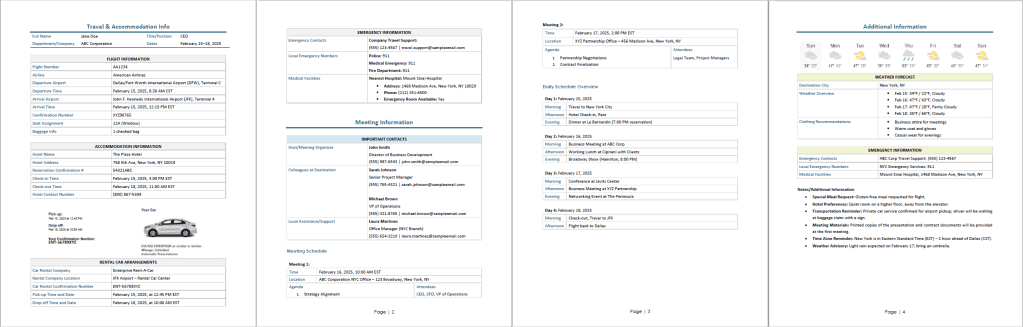
Built for maximum organization, this version includes dedicated sections for flight/lodging confirmation, detailed meeting schedules, daily overview, and all emergency contact information.
2. Condensed Business Travel Itinerary Template
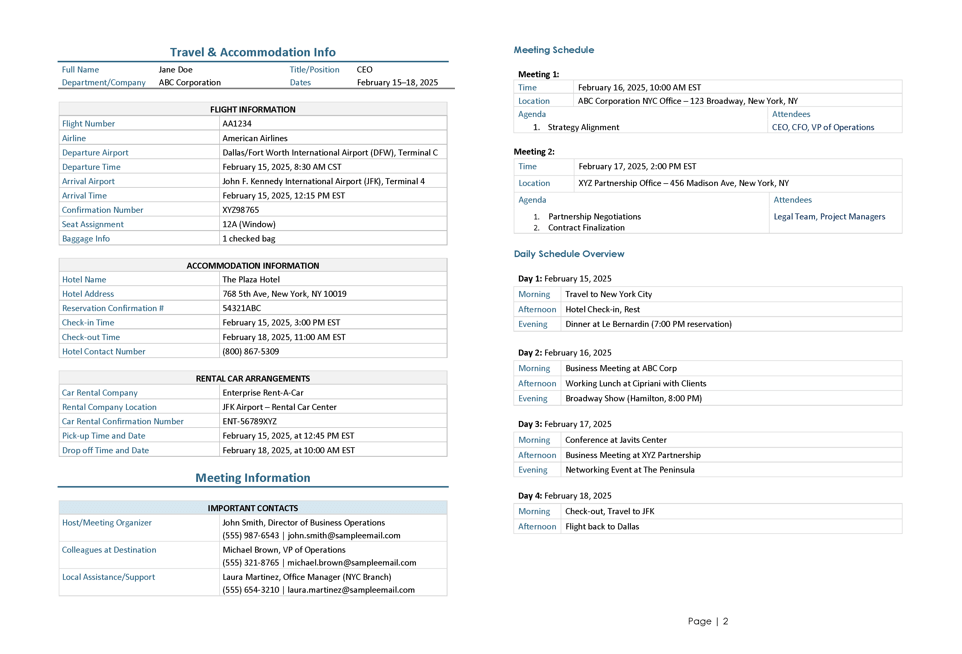
This streamlined version provides only the most essential details (key travel times, meeting locations, and meeting schedule) for quick reference while traveling on the go.
The Final Check: Is Your Itinerary Actually Ready?
Before you hit send, ask yourself:
- Can they figure out where to be at any given moment in under 10 seconds?
- Did you specify time zones every single time you mentioned a time?
- Does every booking have a confirmation number?
- Can they access this on their phone without WiFi? (Send PDF + editable version)
- Did you proof-read dates, times, and addresses?
- Is your contact info prominently displayed?
- Would this itinerary still be useful if their phone died?
If you answered yes to all of those, you’ve built a solid business travel itinerary.
When Things Go Wrong (Because They Will)
Even perfect itineraries can’t prevent flight cancellations, lost luggage, or surprise schedule changes. But a good itinerary makes problems solvable.
What to do when travel plans change:
- Update the itinerary immediately and resend with “UPDATED” in the subject line
- Text or call with the critical change—don’t assume they’ll see the email
- Update any affected parties (meeting attendees, hotel, car service)
- Keep the old version archived in case you need to reference original plans
Have a contingency plan section for high-stakes trips: backup flight options, alternative hotels nearby, emergency transportation contacts.
The Bottom Line on Business Travel Itineraries
This business travel itinerary guide comes down to one principle: make it so clear and complete that your executive could hand it to a stranger, and that stranger could get them through the entire trip.
That’s the standard. Anything less is just wishful thinking printed on paper.
Good itineraries are detailed but scannable, comprehensive but not overwhelming, and always—always—assume the traveler is stressed, jet-lagged, or dealing with something unexpected.
Build your itineraries with that reality in mind, and you’ll save everyone time, stress, and those panicked “where am I supposed to be?” moments.
You Might Also Enjoy:






Leave a comment